
Lincoln Aviator 2020-2026 Service Manual / Powertrain / Engine / Engine - 3.0L EcoBoost / Removal and Installation - Crankshaft Front Seal
Lincoln Aviator: Engine - 3.0L EcoBoost / Removal and Installation - Crankshaft Front Seal
Special Tool(s) / General Equipment
.jpg) |
303-1531 Installer, Front Crank Seal and Damper |
.jpg) |
303-335
(T88T-6701-A)
Installer, Front Cover Oil Seal TKIT-1988-FLM TKIT-1988-F |
.jpg) |
303-409
(T92C-6700-CH)
Remover, Crankshaft Seal TKIT-1992-FH/FMH/FLMH TKIT-1993-LMH/MH |
Removal
-
Remove the crankshaft pulley.
Refer to: Crankshaft Pulley (303-01A Engine - 3.0L EcoBoost, Removal and Installation).
-
NOTICE: Use care not to damage the engine front cover or the crankshaft when removing the seal.
-
Install the crankshaft pulley bolt.
-
Using the special tool, remove and discard the crankshaft front oil seal.
Use Special Service Tool: 303-409 (T92C-6700-CH) Remover, Crankshaft Seal.
-
NOTE: If further disassembly of the engine will be performed, retain the original crankshaft pulley bolt for turning the crankshaft while the pulley is removed.
Remove and discard the crankshaft pulley bolt.
-
Install the crankshaft pulley bolt.
.jpg) |
Installation
-
Lubricate the engine front cover bore with clean engine oil.
.jpg) |
-
Using the special tools, install the new crankshaft front oil seal.
Use Special Service Tool: 303-335 (T88T-6701-A) Installer, Front Cover Oil Seal. , 303-1531 Installer, Front Crank Seal and Damper.
.jpg) |
-
Install the crankshaft pulley.
Refer to: Crankshaft Pulley (303-01A Engine - 3.0L EcoBoost, Removal and Installation).
 Removal and Installation - Camshaft Roller Follower
Special Tool(s) /
General Equipment
303-1633Remover, Roller Rocker FollowerTKIT-2014D-ROW3TKIT-2014D-FL_ROW
Removal
NOTICE:
During engine repair procedures, cleanliness is extremely
important...
 Removal and Installation - Crankshaft Pulley
Special Tool(s) /
General Equipment
303-1531Installer, Front Crank Seal and Damper
303-335
(T88T-6701-A)
Installer, Front Cover Oil SealTKIT-1988-FLMTKIT-1988-F
Three Leg Puller
Removal
NOTICE:
During engine repair procedures, cleanliness is extremely
important...
Other information:
Lincoln Aviator 2020-2026 Service Manual: General Procedures - Piston Selection
Check NOTE: Refer to the appropriate Section 303-01 for the specifications. NOTE: The cylinder bore must be within the specifications for taper and out-of-round before fitting a piston. Measure the cylinder bore in 2 directions...
Lincoln Aviator 2020-2026 Owners Manual: Electric Parking Brake
WARNING: Always fully apply the parking brake and make sure you shift into park (P). Failure to follow this instruction could result in personal injury or death. WARNING: If you drive extended distances with the parking brake applied, you could cause damage to the brake system...
Categories
- Manuals Home
- Lincoln Aviator Owners Manual
- Lincoln Aviator Service Manual
- Configuring The Head Up Display
- Changing the Front Wiper Blades - Vehicles With: Heated Wiper Blades
- General Procedures - Transmission Fluid Drain and Refill
- New on site
- Most important about car
Activating Intelligent Access
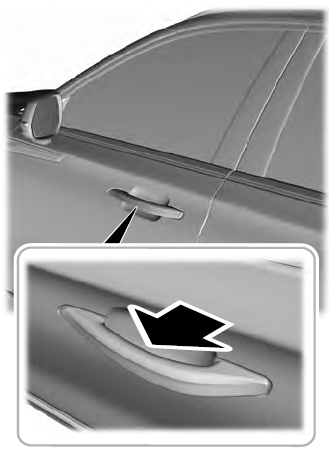
The intelligent access key must be within 3 ft (1 m) of the door or luggage compartment you intend to lock or unlock.
At a Door
Electronic door handles are on each door. Gently depress the switch inside the exterior door handle to unlock and open the door. An unlock symbol illuminates on the door window trim indicating your vehicle is unlocked.

Copyright © 2026 www.liaviator2.com