
Lincoln Aviator 2020-2026 Service Manual / Chassis / Suspension / Vehicle Dynamic Suspension / Removal and Installation - Front Suspension Height Sensor
Lincoln Aviator: Vehicle Dynamic Suspension / Removal and Installation - Front Suspension Height Sensor
Removal
NOTE: Removal steps in this procedure may contain installation details.
-
Remove the wheel and tire.
Refer to: Wheel and Tire (204-04A Wheels and Tires, Removal and Installation).
-
NOTE: LH sensor assembly shown, RH similar.
Remove the front suspension height sensor.
-
Disconnect the front height sensor electrical connector.
-
Remove the ball stud from the lower control arm.
Torque: 80 lb.in (9 Nm)
-
Remove the front height sensor bracket bolt and remove the front height sensor.
Torque: 133 lb.in (15 Nm)
-
Disconnect the front height sensor electrical connector.
.jpg) |
Installation
All vehicles
-
NOTE: The RH (right-hand) and LH (left-hand) height sensor assemblies cannot be used on opposite sides of the vehicle.
To install, reverse the removal procedure.
Vehicles Equipped With Air Suspension
-
Complete the SUMA ride height calibration. Connect the scan tool and carry out the Ride Height Calibration routine.
All vehicles
-
Complete the VDM ride height calibration. Connect the scan tool and carry out the Ride Height Calibration routine.
 Removal and Installation - Air Suspension Reservoir
Removal
WARNING:
Vent all air pressure from the air suspension system prior
to disconnecting or removing any air suspension components. It is
dangerous to remove air suspension components while under pressure...
 Removal and Installation - Rear Air Spring
Removal
WARNING:
Vent all air pressure from the air suspension system prior
to disconnecting or removing any air suspension components. It is
dangerous to remove air suspension components while under pressure...
Other information:
Lincoln Aviator 2020-2026 Service Manual: Diagnosis and Testing - Trailer Lamps
Diagnostic Trouble Code (DTC) Chart Diagnostics in this manual assume a certain skill level and knowledge of Ford-specific diagnostic practices. REFER to: Diagnostic Methods (100-00 General Information, Description and Operation). Diagnostic Trouble Code Chart Module DTC Description Action BCM B1449:12 Trailer Tow Park/Tail Lamp Output: Circuit Short To Battery GO to Pinpoint Test C BCM B1449:14 Trailer Tow Park/Tail Lamp Output: Circuit Short To Ground or Open GO to Pinpoint Test C TRM B10E8:4B Secondary Battery Relay "A": Over Temperature GO to Pinpoint Test E TRM B1D08:11 Left Trailer Direction Indicator: Circuit Short To Ground GO to Pinpoint Test B TRM B1D08:12 Left Trailer Direction Indicator: Circuit Short To Battery GO to Pinpoint Test B TRM B1D09:11 Right Trailer Direction Indicator: Circuit Short To Ground GO to Pinpoint Test B TRM B1D09:12 Right Trailer Direction Indicator: Circuit Short To Battery GO to Pinpoint Test B TRM U0140:00 Lost Communication With Body Control Module: No Sub-Type Information GO to Pinpoint Test F TRM U1000:00 Solid State Driver Protection Active -Driver Disabled: No Sub Type Information GO to Pinpoint Test H TRM U2100:00 Initial Configuration Not Complete: No Sub Type Information GO to Pinpoint Test G TRM U3000:49 Control Module: Internal Electronic Failure GO to Pinpoint Test H Symptom Charts Symptom Chart: Trailer Lamps Diagnostics in this manual assume a certain skill level and knowledge of Ford-specific diagnostic practices...
Lincoln Aviator 2020-2026 Service Manual: General Procedures - Exhaust Manifold Cleaning and Inspection
Special Tool(s) / General Equipment Feeler Gauge Cleaning Clean the exhaust manifold using a suitable solvent. Use a plastic scraping tool to clean the gasket sealing surfaces. Inspection NOTE: New exhaust manifold gaskets, studs, nuts and/or bolts must be installed when an exhaust manifold is serviced...
Categories
- Manuals Home
- Lincoln Aviator Owners Manual
- Lincoln Aviator Service Manual
- Resetting the System
- Disabling Auto-Start-Stop
- Tire Change Procedure
- New on site
- Most important about car
Adjusting the Steering Wheel - Vehicles With: Manual Adjustable Steering Column
WARNING: Do not adjust the steering wheel when your vehicle is moving.
Note: Make sure that you are sitting in the correct position.
Unlock the steering column. Adjust the steering wheel to the desired position.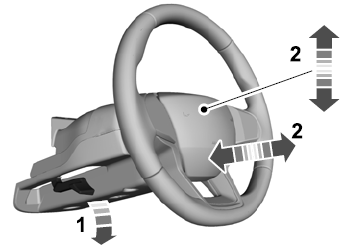

Copyright © 2026 www.liaviator2.com