
Lincoln Aviator 2020-2026 Service Manual / Body and Paint / Body and Paint / Body Closures / Removal and Installation - Fuel Filler Door Spring
Lincoln Aviator: Body Closures / Removal and Installation - Fuel Filler Door Spring
Removal
NOTE: Removal steps in this procedure may contain installation details.
-
Remove the fuel filler door assembly.
Refer to: Fuel Filler Door Assembly (501-03 Body Closures, Removal and Installation).
-
Remove the fuel filler door spring.
-
Press the tab upwards to release the fuel filler door spring from the fuel filler door assembly.
-
Pull and remove the fuel filler door spring.
-
Press the tab upwards to release the fuel filler door spring from the fuel filler door assembly.
.jpg) |
Installation
-
To install, reverse the removal procedure.
 Removal and Installation - Fuel Filler Door Assembly - Plug-In Hybrid Electric Vehicle (PHEV)
Special Tool(s) /
General Equipment
Flat Headed Screw Driver
Knife
Removal
NOTE:
Removal steps in this procedure may contain installation details...
 Removal and Installation - Hands-Free Liftgate Actuation Lower Sensor
Removal
NOTE:
Removal steps in this procedure may contain installation details.
Remove the rear bumper cover.
Refer to: Rear Bumper Cover (501-19 Bumpers, Removal and Installation)...
Other information:
Lincoln Aviator 2020-2026 Service Manual: Description and Operation - Torque Converter
Overview Item Description 1 TCC solenoid 2 TCC regulator valve assembly 3 TCC apply circuit 4 TCC release circuit Torque Converter Hydraulic Circuits (TCC Released) Item Description 1 LPC pressure 2 TCC solenoid 3 TCC control pressure 4 TCC regulator valve 5 TCC release pressure 6 TCC 7 TCC exhaust to TCC regulator valve 8 Torque converter anti-drainback valve 9 TCC exhaust 10 Pump output 11 Decreased pressure from main requlator valve Line pressure fills the converter feed circuit with fluid up to 1,103 kPa (160 psi)...
Lincoln Aviator 2020-2026 Service Manual: Removal and Installation - Steering Gear Boot
Special Tool(s) / General Equipment Boot Clamp Pliers Materials Name Specification Motorcraft® Premium Long-Life GreaseXG-1-E1 ESA-M1C75-B Removal NOTICE: The steering gear boots and clamps are designed to provide an airtight seal and protect the internal components of the steering gear...
Categories
- Manuals Home
- Lincoln Aviator Owners Manual
- Lincoln Aviator Service Manual
- General Procedures - Transmission Fluid Drain and Refill
- Resetting the System
- Disabling Auto-Start-Stop
- New on site
- Most important about car
Locking and Unlocking the Doors from Inside
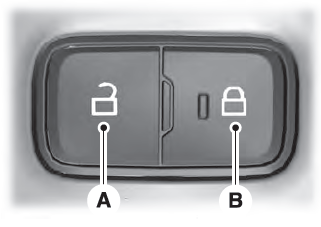
Locking the Doors
Press the lock switch on the door interior trim panel. The doors can no longer be released using the exterior door handle switches and the luggage compartment locks.

Copyright © 2026 www.liaviator2.com