
Lincoln Aviator 2020-2026 Service Manual / Electrical / Battery and Charging System / Battery, Mounting and Cables / Removal and Installation - Generator Current Sensor
Lincoln Aviator: Battery, Mounting and Cables / Removal and Installation - Generator Current Sensor
Removal
NOTE: Removal steps in this procedure may contain installation details.
-
Disconnect the battery/batteries.
Refer to: Battery Disconnect and Connect (414-01 Battery, Mounting and Cables, General Procedures).
-
Release the tabs and remove the BJB cover.
.jpg) |
-
Remove the nut and position the battery cable aside.
Torque: 80 lb.in (9 Nm)
.jpg) |
-
NOTE: The generator current sensor must be installed in the proper position and orientation to function correctly. Note the orientation and position of the generator current sensor tape tab.
Disconnect the generator current sensor electrical connector. Index-mark the battery cable at the generator current sensor. Remove and discard the tape securing the generator current sensor to the battery cable and remove the generator current sensor.
.jpg) |
Installation
-
To install, reverse the removal procedure.
 Removal and Installation - Battery Tray
Removal
NOTE:
Removal steps in this procedure may contain installation details.
Remove the battery.
Refer to: Battery (414-01 Battery, Mounting and Cables, Removal and Installation)...

Other information:
Lincoln Aviator 2020-2026 Service Manual: Removal and Installation - Charge Status Indicator (CSI) - Plug-In Hybrid Electric Vehicle (PHEV)
Removal WARNING: Before beginning any service procedure in this section, refer to Safety Warnings in section 100-00 General Information. Failure to follow this instruction may result in serious personal injury. Refer to: Health and Safety Precautions (100-00 General Information, Description and Operation)...
Lincoln Aviator 2020-2026 Service Manual: Removal and Installation - Rear Lamp Fade Control Module
Removal NOTE: Removal steps in this procedure may contain installation details. Remove the LH loadspace trim panel. Refer to: Loadspace Trim Panel (501-05 Interior Trim and Ornamentation, Removal and Installation). Remove the rear lamp fade control module...
Categories
- Manuals Home
- Lincoln Aviator Owners Manual
- Lincoln Aviator Service Manual
- Disabling Auto-Start-Stop
- Garage Door Opener
- Configuring The Head Up Display
- New on site
- Most important about car
Adjusting the Steering Wheel - Vehicles With: Manual Adjustable Steering Column
WARNING: Do not adjust the steering wheel when your vehicle is moving.
Note: Make sure that you are sitting in the correct position.
Unlock the steering column. Adjust the steering wheel to the desired position.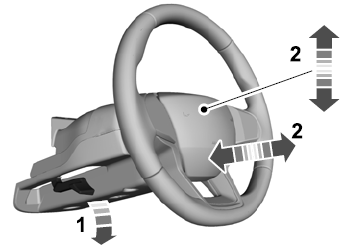

Copyright © 2026 www.liaviator2.com