
Lincoln Aviator 2020-2026 Service Manual / Body and Paint / Body and Paint / Second Row Seats / Removal and Installation - Second Row Seat Armrest
Lincoln Aviator: Second Row Seats / Removal and Installation - Second Row Seat Armrest
Special Tool(s) / General Equipment
| Interior Trim Remover |
Removal
NOTE: Removal steps in this procedure may contain installation details.
-
Remove the second row center seat.
Refer to: Second Row Center Seat (501-10B Second Row Seats, Removal and Installation).
-
Lift the second row center seat backrest cover.
-
Remove the child safety seat tether anchor bezel.
Use the General Equipment: Interior Trim Remover
-
Release the J-clip.
-
Unzip the backrest cover.
-
Lift the backrest cover.
-
Remove the child safety seat tether anchor bezel.
.jpg) |
-
Release the hook-and-loop retainers and position the second row center seat backrest cover aside.
.jpg) |
-
NOTE: When removing the command control wiring harness retainers note the specific locations for installation.
If equipped.
-
Disconnect the command control sun shade electrical connector.
-
Disconnect the command control module electrical connectors.
-
Remove the wiring harness retainers.
-
Disconnect the command control sun shade electrical connector.
.jpg) |
-
Remove the second row seat armrest bolts.
Torque: 89 lb.in (10 Nm)
.jpg) |
-
NOTE: If equipped with a command control armrest, note the location of the wiring harness pigtail as it passes through the seat.
Release the clips and remove the second row seat armrest.
.jpg) |
Installation
-
To install, reverse the removal procedure.
 Removal and Installation - Second Row Seat - Vehicles With: Second Row Captain Chairs
Special Tool(s) /
General Equipment
Interior Trim Remover
Removal
WARNING:
The following procedure describes critical repair steps
required for correct seat component installation...
 Removal and Installation - Second Row Seat Backrest Blower Motor
Removal
Remove the second row single seat backrest cover.
Refer to: Second Row Single Seat Backrest Cover - Vehicles With: Second Row Captain Chairs (501-10B Second Row Seats, Removal and Installation)...
Other information:
Lincoln Aviator 2020-2026 Owners Manual: Recycled Coolant. Severe Climates. Coolant Change
Recycled Coolant We do not recommend the use of recycled coolant as an approved recycling process is not yet available. Note: Dispose of used coolant in the appropriate manner. Follow your community's regulations and standards for recycling and disposing of automotive fluids...
Lincoln Aviator 2020-2026 Service Manual: General Procedures - Bearing Inspection
I..
Categories
- Manuals Home
- Lincoln Aviator Owners Manual
- Lincoln Aviator Service Manual
- Changing the Front Wiper Blades - Vehicles With: Heated Wiper Blades
- Description and Operation - Jacking and Lifting
- Resetting the System
- New on site
- Most important about car
Locking and Unlocking the Doors from Inside
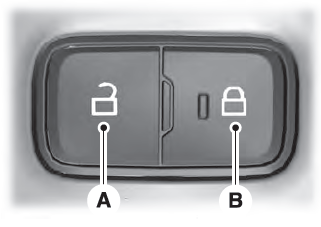
Locking the Doors
Press the lock switch on the door interior trim panel. The doors can no longer be released using the exterior door handle switches and the luggage compartment locks.

Copyright © 2026 www.liaviator2.com