
Lincoln Aviator 2020-2026 Service Manual / Body and Paint / Body and Paint / Third Row Seats / Removal and Installation - Third Row Seat Backrest Cover
Lincoln Aviator: Third Row Seats / Removal and Installation - Third Row Seat Backrest Cover
Special Tool(s) / General Equipment
| Flat-Bladed Screwdriver | |
| Interior Trim Remover |
Removal
NOTE: LH (left hand) shown, RH (right hand) similar.
-
Remove the third row seat backrest.
Refer to: Third Row Seat Backrest (501-10C Third Row Seats, Removal and Installation).
-
-
Release the spring tension.
Use the General Equipment: Flat-Bladed Screwdriver
-
Remove the third row head restraint pad.
-
Release the spring tension.
.jpg) |
-
Release the tabs and remove the manual head restraint release handle bezel.
.jpg) |
-
Detach the J-clip from the third row seat frame.
.jpg) |
-
Release the third row seat backrest cover J-clip.
.jpg) |
-
Release the tabs and remove the child safety seat tether anchor bezel.
Use the General Equipment: Interior Trim Remover
.jpg) |
-
NOTICE: Use care when separating the backrest cover from the hook-and-loop strips or the hook-and-loop strips may be torn from the backrest foam.
Remove the third row seat backrest cover.
-
Roll the backrest cover up while detaching the hook-and-loop strips.
-
Route the manual head restraint release strap through the backrest cover.
-
Roll the backrest cover up while detaching the hook-and-loop strips.
.jpg) |
Installation
-
To install, reverse the removal procedure.
 Removal and Installation - Third Row Seat Backrest
Special Tool(s) /
General Equipment
Interior Trim Remover
Removal
WARNING:
The following procedure describes critical repair steps
required for correct seat component installation...
 Removal and Installation - Third Row Seat Cushion
Special Tool(s) /
General Equipment
Interior Trim Remover
Removal
WARNING:
The following procedure describes critical repair steps
required for correct seat component installation...
Other information:
Lincoln Aviator 2020-2026 Service Manual: Removal and Installation - Front Seat Cushion Cover - Vehicles Without: Multi-Contour Seats
Removal Passenger seat Remove the OCS. Refer to: Occupant Classification System (OCS) Sensor - Vehicles Without: Multi-Contour Seats (501-20B Supplemental Restraint System, Removal and Installation). Driver seat Remove the front seat...
Lincoln Aviator 2020-2026 Owners Manual: Owner Checks and Services
M..
Categories
- Manuals Home
- Lincoln Aviator Owners Manual
- Lincoln Aviator Service Manual
- Fuel Quality
- Tire Change Procedure
- Description and Operation - Jacking and Lifting
- New on site
- Most important about car
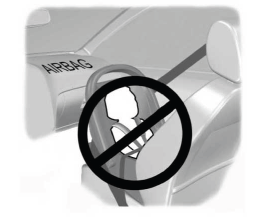
Children and Airbags
WARNING: Airbags can kill or injure a child in a child restraint. Never place a rear-facing child restraint in front of an active airbag. If you must use a forward-facing child restraint in the front seat, move the seat upon which the child restraint is installed all the way back.

Copyright © 2026 www.liaviator2.com