Lincoln Aviator: Starting and Stopping the Engine / Starting a Hybrid Electric Vehicle System
Before starting your vehicle, check the following:
- Make sure all occupants fasten their seatbelt.
- Make sure the headlamps and electrical accessories are off.
- Make sure the parking brake is on.
- Put the transmission in park (P).
Note: Do not touch the accelerator pedal.
- Fully press the brake pedal.
- Press the push button ignition switch.
Note: The green ready indicator illuminates letting you know that your vehicle is ready for driving. Since your vehicle comes with a silent key start, the engine may not start when your vehicle starts.
When the engine starts for the first time on your drive, the idle speed increases, this helps to warm up the engine. If the engine idle speed does not slow down automatically, have your vehicle checked by an authorized dealer.
The system does not function if:
- The passive key frequencies are jammed.
- The key battery has no charge.
If you are unable to start your vehicle, do the following:
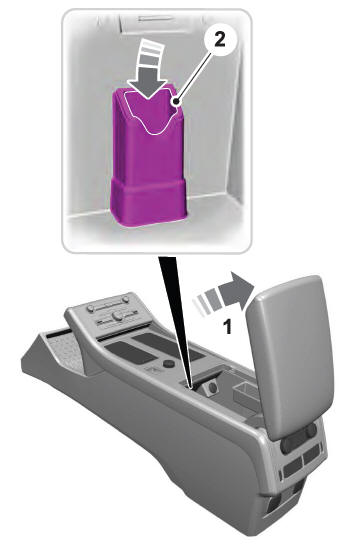
- Open the floor console storage compartment lid.
- Insert the passive key into the backup slot.
- With the key in this position, press the brake pedal then press the push button ignition switch to switch the ignition on and start your vehicle.
- Fast Restart. Vehicles Using Phone as a Key
- Phone as a Key Backup Starting Passcode
- Automatic Engine Shutdown. Automatic Engine Shutdown Override
- Switching Off Your Vehicle When It Is Stationary
- Switching Off Your Vehicle When It Is Moving
- Guarding Against Exhaust Fumes. Important Ventilating Information
 Guarding Against Exhaust Fumes. Important Ventilating Information
Guarding Against Exhaust Fumes
WARNING: Exhaust leaks may result
in entry of harmful and potentially lethal
fumes into the passenger compartment. If
you smell exhaust fumes inside your
vehicle, have your vehicle inspected
immediately...
 Fast Restart. Vehicles Using Phone as a Key
Fast Restart
The fast restart feature allows you to restart
your vehicle within 20 seconds of switching
it off, even if it does not detect a valid
passive key...
Other information:
Lincoln Aviator 2020-2026 Service Manual: Description and Operation - Handles, Locks, Latches and Entry Systems - System Operation and Component Description
System Operation System Diagrams NOTE: The Phone As A Key feature can also be used to lock/unlock the vehicle. Refer to section 419-01C for information regarding this feature. NOTE: Not all vehicles come equipped with all the items listed in the system diagrams...
Lincoln Aviator 2020-2026 Owners Manual: Android Auto (If Equipped)
Connect your device to a USB port. Follow the instructions on the touchscreen. Note: You might need to enable Android Auto from the settings menu. Note: Certain features of the system are not available when you are using Android Auto. Switching Android Auto Off Select the settings option on the feature bar...
Categories
- Manuals Home
- Lincoln Aviator Owners Manual
- Lincoln Aviator Service Manual
- Locking and Unlocking
- Wireless Accessory Charger (If Equipped)
- Changing the Front Wiper Blades - Vehicles With: Heated Wiper Blades
- New on site
- Most important about car
Children and Airbags
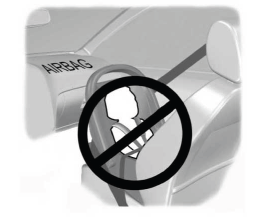
WARNING: Airbags can kill or injure a child in a child restraint. Never place a rear-facing child restraint in front of an active airbag. If you must use a forward-facing child restraint in the front seat, move the seat upon which the child restraint is installed all the way back.