
Lincoln Aviator 2020-2026 Owners Manual / Driving Hints / Economical Driving
Lincoln Aviator: Driving Hints / Economical Driving
Your fuel economy is affected by several things, such as how you drive, the conditions you drive under, and how you maintain your vehicle.
You may improve your fuel economy by keeping these things in mind:
- Accelerate and slow down in a smooth, moderate fashion.
- Drive at steady speeds without stopping.
- Anticipate stops; slowing down may eliminate the need to stop.
- Combine errands and minimize stop-and-go driving.
- Close the windows for high-speed driving.
- Drive at reasonable speeds (traveling at 55 mph [88 km/h] uses 15% less fuel than traveling at 65 mph [105 km/h]).
- Keep the tires properly inflated and use only the recommended size.
- Use the recommended engine oil.
- Perform all regularly scheduled maintenance.
Avoid these actions; they reduce your fuel economy:
- Sudden accelerations or hard accelerations.
- Revving the engine before turning it off.
- Idle for periods longer than one minute.
- Warm up your vehicle on cold mornings.
- Use the air conditioner or front defroster.
- Use the speed control in hilly terrain.
- Rest your foot on the brake pedal while driving.
- Drive a heavily loaded vehicle or tow a trailer.
- Carry unnecessary weight (approximately 1 mpg [0.4 km/L] is lost for every 400 lb [180 kilogram] of weight carried).
- Driving with the wheels out of alignment.
Conditions
- Heavily loading a vehicle or towing a trailer may reduce fuel economy at any speed.
- Adding certain accessories to your vehicle (for example bug deflectors, rollbars, light bars, running boards, ski racks or luggage racks) may reduce fuel economy.
- To maximize the fuel economy, drive with the tonneau cover installed (if equipped).
- Using fuel blended with alcohol may lower fuel economy.
- Fuel economy may decrease with lower temperatures during the first 5–10 mi (12–16 km) of driving.
- Driving on flat terrain offers improved fuel economy as compared to driving on hilly terrain.
- Transmissions give their best fuel economy when operated in the top cruise gear and with steady pressure on the gas pedal.
- Four-wheel-drive operation (if equipped) is less fuel efficient than two-wheel-drive operation.
 Reduced Engine Performance
WARNING: If you continue to drive
your vehicle when the engine is
overheating, the engine could stop without
warning. Failure to follow this instruction
could result in the loss of control of your
vehicle...
 Cold Weather Precautions. Breaking-In. Driving Through Water
Cold Weather Precautions
The functional operation of some
components and systems can be affected at
temperatures below approximately -13°F
(-25°C)...
Other information:
Lincoln Aviator 2020-2026 Service Manual: Description and Operation - Anti-Lock Brake System (ABS) and Stability Control - System Operation and Component Description
System Operation System Diagrams Anti-Lock Brake System (ABS) and Stability Control Item Description 1 EBB assembly 2 ABS module 3 GWM 4 RCM 5 PSCM 6 BCM 7 AWD module 8 IPC 9 IPMA 10 FCIM 11 GSM 12 PCM 13 SODR 14 SODL 15 Brake fluid level switch 16 Hydraulic pressure sensor 17 Hydraulic pump motor 18 Hydraulic valve solenoids 19 IPMB 20 CCM 21 PAM 22 ATCM 23 Wheel speed sensors 24 SOBDMC ( HEV) 25 VDM 26 Actuator position sensor Steering Angle Sensor Module (SASM) — Vehicles With Adaptive Steering Item Description 1 Private CAN 2 SASM 3 Steering wheel rotation sensor 4 LH multifunction switch 5 RH multifunction switch 6 PSCM 7 RCM 8 SUMA 9 SECM (Adaptive Steering Only) 10 GWM 11 PCM 12 BCM 13 APIM 14 IPC 15 HVAC 16 SIMA Network Message Charts Anti-Lock Brake System (ABS) Module - Network Input Messages Module Network Input Messages - ABS Module Broadcast Message Originating Module Message Purpose Accelerator pedal position PCM This message is sent to the GWM and then to the ABS module...
Lincoln Aviator 2020-2026 Service Manual: General Procedures - Bezel Diagnostics
Check NOTE: If there is a concern with one of the following components and Bezel Diagnostics cannot be accessed, obtain the module part number by referencing the label attached to the module. Inoperative ACM Inoperative (blank or does not power on) display unit (non-touchscreen display or touchscreen display) Inoperative FCIM or radio control panel Inoperative steering wheel switch Refer to appropriate 415-00 section to diagnose the inoperative component...
Categories
- Manuals Home
- Lincoln Aviator Owners Manual
- Lincoln Aviator Service Manual
- Tire Change Procedure
- Locking and Unlocking
- Configuring The Head Up Display
- New on site
- Most important about car
Remote Control
Passive Key
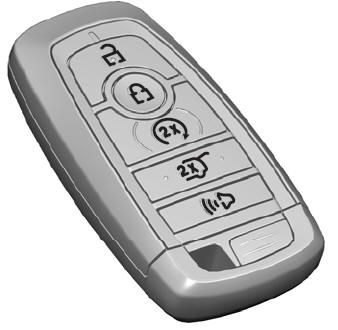
The passive key operates the power locks and the remote start system. The passive key must be in your vehicle to use the push button start.
Note: You may not be able to shift out of park (P) unless the passive key is inside your vehicle.

Copyright © 2026 www.liaviator2.com