Lincoln Aviator: Transmission / Manual Park Release
WARNING: When doing this procedure, you need to take the transmission out of park (P) which means your vehicle can roll freely. To avoid unwanted vehicle movement, always fully apply the parking brake prior to doing this procedure. Use wheels chocks if appropriate.
WARNING: If the parking brake is fully released, but the brake warning lamp remains illuminated, the brakes may not be working properly. Have your vehicle checked as soon as possible.
WARNING: Do not drive your vehicle until you verify that the stoplamps are working.
Use the manual park release to move your transmission from the park (P) position in the event of an electrical malfunction or emergency.
- Activating the Manual Park Release Cable
- Returning Your Vehicle to Normal Mode
- If Your Vehicle Gets Stuck in Mud or Snow
 SelectShift Automatic™ Transmission
Your vehicle has a SelectShift Automatic
transmission. The SelectShift Automatic
transmission gives you the ability to change
gears up or down, without a clutch, as
preferred...
 Activating the Manual Park Release Cable
Apply the parking brake.Note: If vehicle battery is dead, for
example,
no electrical power is available, you could
require an external power source to apply
the parking brake...
Other information:
Lincoln Aviator 2020-2026 Service Manual: Removal and Installation - Roof Front Frame
Special Tool(s) / General Equipment Resistance Spotwelding Equipment Spot Weld Drill Bit Locking Pliers Removal WARNING: Before beginning any service procedure in this manual, refer to health and safety warnings in section 100-00 General Information...
Lincoln Aviator 2020-2026 Service Manual: General Procedures - Headlamp Adjustment
Adjustment NOTE: If the flash video link does not load or is incompatible with your browser, a .wmv version of the video can be accessed at: http://www.fordservicecontent.com/Ford_Content/videos/FusionHeadlampAdj2.wmv Click on the link above to view video...
Categories
- Manuals Home
- Lincoln Aviator Owners Manual
- Lincoln Aviator Service Manual
- Garage Door Opener
- General Procedures - Transmission Fluid Drain and Refill
- Remove and Reinstall the Battery
- New on site
- Most important about car
Fastening the Seatbelts
The front outboard and rear safety restraints in the vehicle are combination lap and shoulder belts.
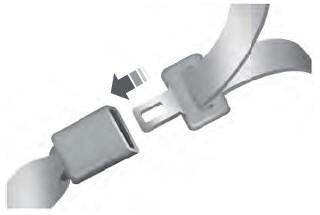
Insert the belt tongue into the proper buckle (the buckle closest to the direction the tongue is coming from) until you hear a snap and feel it latch. Make sure that you securely fasten the tongue in the buckle.