
Lincoln Aviator 2020-2025 Service Manual / Body and Paint / Body and Paint / Glass, Frames and Mechanisms / Removal and Installation - Front Door Glass Run and Bracket
Lincoln Aviator: Glass, Frames and Mechanisms / Removal and Installation - Front Door Glass Run and Bracket
Removal
NOTE: LH (left-hand) side shown, RH (right-hand) side similar.
NOTE: Removal steps in this procedure may contain installation details.
Aft front door glass run and bracket
-
Remove the front door window regulator and motor.
Refer to: Front Door Window Regulator and Motor (501-11 Glass, Frames and Mechanisms, Removal and Installation).
-
Remove the aft front door glass run and bracket.
-
Remove the bolts from the aft front door glass run and bracket.
Torque: 93 lb.in (10.5 Nm)
-
Remove the aft front door glass run and bracket.
-
Remove the bolts from the aft front door glass run and bracket.
.jpg) |
Fore front door glass run and bracket
-
Remove the front door window regulator and motor.
Refer to: Front Door Window Regulator and Motor (501-11 Glass, Frames and Mechanisms, Removal and Installation).
-
Remove the fore front door glass run and bracket.
-
Remove the fore front door glass run and bracket bolts.
Torque: 93 lb.in (10.5 Nm)
-
Remove the fore front door glass run and bracket.
-
Remove the fore front door glass run and bracket bolts.
.jpg) |
Installation
-
To install, reverse the removal procedure.
-
Carry out the power door window initialization.
Refer to: Power Door Window Initialization (501-11 Glass, Frames and Mechanisms, General Procedures).
 Removal and Installation - Driver Door Window Control Switch
Special Tool(s) /
General Equipment
Interior Trim Remover
Removal
Remove the driver door window control switch bezel assembly.
Release the clips...
 Removal and Installation - Front Door Glass Top Run
Removal
NOTE:
LH (left-hand) side shown, RH (right-hand) side similar.
NOTE:
Removal steps in this procedure may contain installation details.
Remove the front door window glass...
Other information:
Lincoln Aviator 2020-2025 Service Manual: Removal - Engine Block Skirt Stiffener
Special Tool(s) / General Equipment 205-153 (T80T-4000-W) Handle 303-1246Engine Spreader BarTKIT-2006UF-FLMTKIT-2006UF-ROW 303-1247VCT Spark Plug Tube Seal Remover and InstallerTKIT-2006UF-FLMTKIT-2006UF-ROW 303-1634Lift Eyes (2)TKIT-2014D-ROW3TKIT-2014D-FL_ROW 303-409 (T92C-6700-CH) Remover, Crankshaft SealTKIT-1992-FH/FMH/FLMHTKIT-1993-LMH/MH Floor Crane Mounting Stand Plastic Scraper Flat-Bladed Screwdriver Materials Name Specification Motorcraft® Silicone Gasket RemoverZC-30-A - Motorcraft® Metal Surface Prep WipesZC-31-B - Motorcraft® Metal Brake Parts CleanerPM-4-A, PM-4-B - NOTICE: During engine repair procedures, cleanliness is extremely important...
Lincoln Aviator 2020-2025 Service Manual: Diagnosis and Testing - Vehicle Dynamic Suspension - Vehicles With: Air Suspension
Diagnostic Trouble Code (DTC) Chart Diagnostics in this manual assume a certain skill level and knowledge of Ford-specific diagnostic practices. REFER to: Diagnostic Methods (100-00 General Information, Description and Operation). Diagnostic Trouble Code Chart Module DTC Description Action SUMA B1041:52 Levelling Control: Not Activated GO to Pinpoint Test W SUMA C1043:00 Pressure Decrease Too Slow From Reservoir: No Sub Type Information GO to Pinpoint Test M SUMA C104C:11 Left Rear Spring Rate Valve: Circuit Short To Ground GO to Pinpoint Test E SUMA C104C:12 Left Rear Spring Rate Valve: Circuit Short To Battery GO to Pinpoint Test E SUMA C104C:13 Left Rear Spring Rate Valve: Circuit Open GO to Pinpoint Test E SUMA C104C:1A Left Rear Spring Rate Valve: Circuit Resistance Below Threshold GO to Pinpoint Test E SUMA C104C:1F Left Rear Spring Rate Valve: Circuit Intermittent GO to Pinpoint Test E SUMA C104D:11 Right Front Spring Rate Valve: Circuit Short To Ground GO to Pinpoint Test D SUMA C104D:12 Right Front Spring Rate Valve: Circuit Short To Battery GO to Pinpoint Test D SUMA C104D:13 Right Front Spring Rate Valve: Circuit Open GO to Pinpoint Test D SUMA C104D:1A Right Front Spring Rate Valve: Circuit Resistance Below Threshold GO to Pinpoint Test D SUMA C104D:1F Right Front Spring Rate Valve: Circuit Intermittent GO to Pinpoint Test D SUMA C104E:11 Right Rear Spring Rate Valve: Circuit Short To Ground GO to Pinpoint Test F SUMA C104E:12 Right Rear Spring Rate Valve: Circuit Short To Battery GO to Pinpoint Test F SUMA C104E:13 Right Rear Spring Rate Valve: Circuit Open GO to Pinpoint Test F SUMA C104E:1A Right Rear Spring Rate Valve: Circuit Resistance Below Threshold GO to Pinpoint Test F SUMA C104E:1F Right Rear Spring Rate Valve: Circuit Intermittent GO to Pinpoint Test F SUMA C104F:11 Left Front Spring Rate Valve: Circuit Short To Ground GO to Pinpoint Test C SUMA C104F:12 Left Front Spring Rate Valve: Circuit Short To Battery GO to Pinpoint Test C SUMA C104F:13 Left Front Spring Rate Valve: Circuit Open GO to Pinpoint Test C SUMA C104F:1A Left Front Spring Rate Valve: Circuit Resistance Below Threshold GO to Pinpoint Test C SUMA C104F:1F Left Front Spring Rate Valve: Circuit Intermittent GO to Pinpoint Test C SUMA C1124:07 Height Sensor(s): Mechanical Failures GO to Pinpoint Test G SUMA C1124:11 Height Sensor(s): Circuit Short To Ground GO to Pinpoint Test H SUMA C1124:12 Height Sensor(s): Circuit Short To Battery GO to Pinpoint Test H SUMA C1124:54 Height Sensor(s): Missing Calibration GO to Pinpoint Test U SUMA C1A03:2A Left Front Height Sensor: Stuck in Range GO to Pinpoint Test I SUMA C1A03:34 Left Front Height Sensor: Signal High Time Less Than Minimum GO to Pinpoint Test I SUMA C1A03:35 Left Front Height Sensor: Signal High Time Greater Than Maximum GO to Pinpoint Test I SUMA C1A03:36 Left Front Height Sensor: Signal Frequency Too Low GO to Pinpoint Test I SUMA C1A03:37 Left Front Height Sensor: Signal Frequency Too High GO to Pinpoint Test I SUMA C1A03:84 Left Front Height Sensor: Signal Below Allowable Range GO to Pinpoint Test I SUMA C1A03:85 Left Front Height Sensor: Signal Above Allowable Range GO to Pinpoint Test I SUMA C1A04:2A Right Front Height Sensor: Stuck in Range GO to Pinpoint Test J SUMA C1A04:34 Right Front Height Sensor: Signal High Time Less Than Minimum GO to Pinpoint Test J SUMA C1A04:35 Right Front Height Sensor: Signal High Time Greater Than Maximum GO to Pinpoint Test J SUMA C1A04:36 Right Front Height Sensor: Signal Frequency Too Low GO to Pinpoint Test J SUMA C1A04:37 Right Front Height Sensor: Signal Frequency Too High GO to Pinpoint Test J SUMA C1A04:84 Right Front Height Sensor: Signal Below Allowable Range GO to Pinpoint Test J SUMA C1A04:85 Right Front Height Sensor: Signal Above Allowable Range GO to Pinpoint Test J SUMA C1A05:2A Left Rear Height Sensor: Stuck in Range GO to Pinpoint Test K SUMA C1A05:34 Left Rear Height Sensor: Signal High Time Less Than Minimum GO to Pinpoint Test K SUMA C1A05:35 Left Rear Height Sensor: Signal High Time Greater Than Maximum GO to Pinpoint Test K SUMA C1A05:36 Left Rear Height Sensor: Signal Frequency Too Low GO to Pinpoint Test K SUMA C1A05:37 Left Rear Height Sensor: Signal Frequency Too High GO to Pinpoint Test K SUMA C1A05:84 Left Rear Height Sensor: Signal Below Allowable Range GO to Pinpoint Test K SUMA C1A05:85 Left Rear Height Sensor: Signal Above Allowable Range GO to Pinpoint Test K SUMA C1A06:2A Right Rear Height Sensor: Stuck in Range GO to Pinpoint Test L SUMA C1A06:34 Right Rear Height Sensor: Signal High Time Less Than Minimum GO to Pinpoint Test L SUMA C1A06:35 Right Rear Height Sensor: Signal High Time Greater Than Maximum GO to Pinpoint Test L SUMA C1A06:36 Right Rear Height Sensor: Signal Frequency Too Low GO to Pinpoint Test L SUMA C1A06:37 Right Rear Height Sensor: Signal Frequency Too High GO to Pinpoint Test L SUMA C1A06:84 Right Rear Height Sensor: Signal Below Allowable Range GO to Pinpoint Test L SUMA C1A06:85 Right Rear Height Sensor: Signal Above Allowable Range GO to Pinpoint Test L SUMA C1A20:00 Pressure Increase Too Slow When Filling Reservoir: No Sub Type Information GO to Pinpoint Test M SUMA C1A27:09 Compressor: Component Failures GO to Pinpoint Test N SUMA C1A27:63 Compressor: Circuit/Component Protection Time-Out GO to Pinpoint Test N SUMA C1A27:98 Compressor: Component Or System Over Temperature GO to Pinpoint Test N SUMA C1A27:99 Compressor: Exceeded Learning Limit GO to Pinpoint Test N SUMA C1A31:63 Left Front Corner Valve: Circuit/Component Protection Time-Out GO to Pinpoint Test AD SUMA C1A32:63 Right Front Corner Valve: Circuit/Component Protection Time-Out GO to Pinpoint Test AD SUMA C1A33:63 Left Rear Corner Valve: Circuit/Component Protection Time-Out GO to Pinpoint Test AD SUMA C1A34:63 Right Rear Corner Valve: Circuit/Component Protection Time-Out GO to Pinpoint Test AD SUMA C1A36:63 Exhaust Valve: Circuit/Component Protection Time-Out GO to Pinpoint Test AD SUMA U0100:87 Lost Communication With ECM / PCM: Missing Message GO to Pinpoint Test O SUMA U0121:87 Lost Communication With Anti-Lock Brake System (ABS) Control Module: Missing Message GO to Pinpoint Test P SUMA U0122:87 Lost Communication With Vehicle Dynamics Control Module: Missing Message GO to Pinpoint Test Q SUMA U0131:87 Lost Communication With Power Steering Control Module "A": Missing Message GO to Pinpoint Test R SUMA U0140:87 Lost Communication With Body Control Module: Missing Message GO to Pinpoint Test S SUMA U0146:87 Lost Communication With Serial Data Gateway "A": Missing Message GO to Pinpoint Test T SUMA U0401:00 Invalid Data Received from ECM/PCM A: No Sub Type Information GO to Pinpoint Test X SUMA U0415:00 Invalid Data Received from Anti-Lock Brake System (ABS) Control Module "A": No Sub Type Information GO to Pinpoint Test Y SUMA U0416:00 Invalid Data Received From Vehicle Dynamics Control Module: No Sub Type Information GO to Pinpoint Test Z SUMA U0420:00 Invalid Data Received from Power Steering Control Module "A": No Sub Type Information GO to Pinpoint Test AA SUMA U0422:00 Invalid Data Received From Body Control Module: No Sub Type Information GO to Pinpoint Test AB SUMA U0447:00 Invalid Data Received From Serial Data Gateway "A": No Sub Type Information GO to Pinpoint Test AC SUMA U2100:00 Initial Configuration Not Complete: No Sub Type Information GO to Pinpoint Test V SUMA U2100:56 Initial Configuration Not Complete: Invalid/Incompatible Configuration GO to Pinpoint Test V SUMA U3000:04 Control Module: System Internal Failures GO to Pinpoint Test V SUMA U3000:45 Control Module: Program Memory Failure GO to Pinpoint Test V SUMA U3000:46 Control Module: Calibration/Parameter Memory Failure GO to Pinpoint Test V SUMA U3000:47 Control Module: Watchdog/Safety µC Failure GO to Pinpoint Test V SUMA U3000:48 Control Module: Supervision Software Failure GO to Pinpoint Test V SUMA U3003:16 Battery Voltage: Circuit Voltage Below Threshold GO to Pinpoint Test A SUMA U3003:17 Battery Voltage: Circuit Voltage Above Threshold GO to Pinpoint Test B Symptom Chart Symptom Chart: Vehicle Dynamic Suspension Diagnostics in this manual assume a certain skill level and knowledge of Ford-specific diagnostic practices...
Categories
- Manuals Home
- Lincoln Aviator Owners Manual
- Lincoln Aviator Service Manual
- Interior Lamps
- Opening and Closing the Hood
- Tire Change Procedure
- New on site
- Most important about car
Remote Control
Passive Key
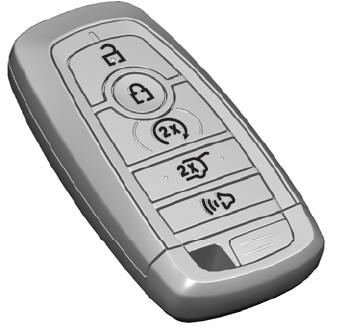
The passive key operates the power locks and the remote start system. The passive key must be in your vehicle to use the push button start.
Note: You may not be able to shift out of park (P) unless the passive key is inside your vehicle.

Copyright © 2025 www.liaviator2.com