
Lincoln Aviator 2020-2026 Service Manual / Body and Paint / Body and Paint / Interior Trim and Ornamentation / Removal and Installation - Front Scuff Plate Trim Panel
Lincoln Aviator: Interior Trim and Ornamentation / Removal and Installation - Front Scuff Plate Trim Panel
Special Tool(s) / General Equipment
| Interior Trim Remover |
Removal
NOTE: LH (left hand) shown, RH (right hand) similar.
All sides
-
Release the clips and remove the instrument panel side trim panel.
Use the General Equipment: Interior Trim Remover
.jpg) |
-
Remove the cowl side trim panel.
-
Release the cowl side trim panel lower clip.
Use the General Equipment: Interior Trim Remover
-
Slide the cowl side trim panel downward and out to release the upper tab.
-
Release the cowl side trim panel lower clip.
.jpg) |
Left hand side
-
Remove the hood latch release handle.
Refer to: Hood Latch Release Handle (501-14 Handles, Locks, Latches and Entry Systems, Removal and Installation).
All sides
-
Remove the front scuff plate trim panel.
-
Release the clips.
Use the General Equipment: Interior Trim Remover
-
If equipped.
Disconnect the front scuff plate trim panel electrical connector.
-
Release the clips.
.jpg) |
Installation
-
To install, reverse the removal procedure.
-
Inspect and position the front door weather strip lip so
that it overlaps the cowl side trim panel and the front scuff plate
trim panel.
.jpg) |
 Removal and Installation - Front Door Trim Panel
Special Tool(s) /
General Equipment
Interior Trim Remover
Removal
NOTE:
LH (left hand) shown, RH (right hand) similar.
NOTE:
Removal steps in this procedure may contain installation details...
 Removal and Installation - Headliner
Special Tool(s) /
General Equipment
Pick Hook
Interior Trim Remover
Materials
Name
Specification
3M™ Super-Fast Repair Adhesive04747
-
Removal
Remove the following items:
On both sides...
Other information:
Lincoln Aviator 2020-2026 Service Manual: Removal and Installation - Intrusion Sensor
Removal Remove the overhead console. Refer to: Overhead Console (501-12 Instrument Panel and Console, Removal and Installation). Remove the intrusion sensor. Release the tab on the LH outer sensor. Release the tab on the center sensor...
Lincoln Aviator 2020-2026 Owners Manual: Replacement Parts Recommendation
We have built your vehicle to the highest standards using quality parts. We recommend that you demand the use of genuine Ford, Lincoln and Motorcraft parts whenever your vehicle requires scheduled maintenance or repair. You can clearly identify genuine Ford, Lincoln and Motorcraft parts by looking for the Ford, Lincoln, FoMoCo or Motorcraft branding on the parts or their packaging...
Categories
- Manuals Home
- Lincoln Aviator Owners Manual
- Lincoln Aviator Service Manual
- Child Safety Locks
- Opening and Closing the Hood
- Description and Operation - Body and Frame
- New on site
- Most important about car
Adjusting the Steering Wheel - Vehicles With: Manual Adjustable Steering Column
WARNING: Do not adjust the steering wheel when your vehicle is moving.
Note: Make sure that you are sitting in the correct position.
Unlock the steering column. Adjust the steering wheel to the desired position.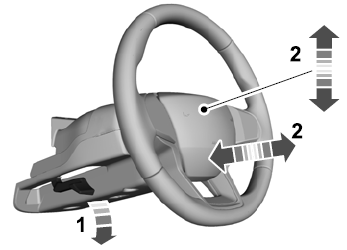

Copyright © 2026 www.liaviator2.com