
Lincoln Aviator: Fuel Tank and Lines - 3.0L EcoBoost / Removal and Installation - Fuel Pump and Sender Unit

Special Tool(s) / General Equipment

310-123
Locking Ring, Fuel Tank
TKIT-2004J-F
TKIT-2005U-LM

Removal


  WARNING: Do not smoke, carry lighted tobacco or have an open flame of any type when working on or near any fuel-related component. Highly flammable mixtures may be present and may be ignited. Failure to follow these instructions may result in serious personal injury.

NOTE: Removal steps in this procedure may contain installation details.

  1. With the vehicle in NEUTRAL, position it on a hoist.
    Refer to: Jacking and Lifting (100-02 Jacking and Lifting, Description and Operation).
  1. Remove the Fuel Tank.
    Refer to: Fuel Tank (310-01A Fuel Tank and Lines - 3.0L EcoBoost, Removal and Installation).
  1. Remove the bolt and shield.
    Torque: 53 lb.in (6 Nm)
  1. NOTE: To avoid introducing contamination into the fuel tank use compressed air to clean the fuel pump and sender unit flange surfaces and the immediate surrounding area of any dirt or foreign material.

    Remove the quick connectors, position the hoses aside, then disconnect the electrical connector.
    Refer to: Quick Release Coupling (310-00A Fuel System - General Information - 3.0L EcoBoost, General Procedures).
  1. NOTE: Note the position of the fuel pump and sender unit for installation.

    Using the special tool remove the lock ring and the fuel pump and sender unit.
    Use Special Service Tool: 310-123  Locking Ring, Fuel Tank.
  1. Lift the Fuel Pump and Sender unit slightly and disconnect the vapor line.
    Refer to: Quick Release Coupling (310-00A Fuel System - General Information - 3.0L EcoBoost, General Procedures).
  1. NOTICE: Take extra care not to damage the fuel tank level sensor and float arm.

    Remove and discard the O-ring.

Installation

  1. NOTICE: Take extra care not to damage the fuel tank level sensor and float arm.

    Reconnect the vapor line.
    Refer to: Quick Release Coupling (310-00A Fuel System - General Information - 3.0L EcoBoost, General Procedures).
  1. NOTE: Use new O-Ring Seal.

    NOTE: Make sure that the seal is correctly located.

  1. NOTE: Make sure that the location marks are aligned.

  1. To install, reverse the removal procedure.

    Removal and Installation - Fuel Lines

    Removal Disconnect the battery. Refer to: Battery Disconnect and Connect (414-01 Battery, Mounting and Cables, General Procedures). With the vehicle in NEUTRAL, position it on a hoist...

    Removal and Installation - Fuel Tank Filler Pipe

    Removal NOTE: Removal steps in this procedure may contain installation steps. Disconnect the battery. Refer to: Battery Disconnect and Connect (414-01 Battery, Mounting and Cables, General Procedures)...

    Other information:

    Lincoln Aviator 2020-2026 Service Manual: Removal and Installation - Rear Door


    Removal NOTE: Removal steps in this procedure may contain installation details. NOTE: LH side shown, RH side similar. Open the door. Remove the check arm bolt. Torque: 18 lb.ft (25 Nm) Disconnect the rear door electrical connector...

    Lincoln Aviator 2020-2026 Service Manual: Diagnosis and Testing - Passive Anti-Theft System (PATS)


    Diagnostic Trouble Code (DTC) Chart Diagnostics in this manual assume a certain skill level and knowledge of Ford-specific diagnostic practices. REFER to: Diagnostic Methods (100-00 General Information, Description and Operation).   Diagnostic Trouble Code Chart Module   DTC Description Action   BCM B1551:51 Phone As A Key: Not Programmed   GO to Pinpoint Test G   BCM B155E:00 Incorrect Response from Immobilizer SubControl Module: No Sub Type Information   GO to Pinpoint Test M   RFA B1589:29 Antenna #3: Signal Invalid   GO to Pinpoint Test A   RFA B1589:31 Antenna #3: No Signal   GO to Pinpoint Test A   RFA B1589:45 Antenna #3: Program Memory Failure   GO to Pinpoint Test A   RFA B1589:49 Antenna #3: Internal Electronic Failure   GO to Pinpoint Test A   RFA B1589:57 Antenna #3: Invalid/ Incompatible Software Component   GO to Pinpoint Test A   RFA B1590:29 Antenna #4: Signal Invalid   GO to Pinpoint Test A   RFA B1590:31 Antenna #4: No Signal   GO to Pinpoint Test A   RFA B1590:45 Antenna #4: Program Memory Failure   GO to Pinpoint Test A   RFA B1590:49 Antenna #4: Internal Electronic Failure   GO to Pinpoint Test A   RFA B1590:57 Antenna #4: Invalid/ Incompatible Software Component   GO to Pinpoint Test A   RFA B1591:29 Antenna #5: Signal Invalid   GO to Pinpoint Test B   RFA B1591:31 Antenna #5: No Signal   GO to Pinpoint Test B   RFA B1591:45 Antenna #5: Program Memory Failure   GO to Pinpoint Test B   RFA B1591:49 Antenna #5: Internal Electronic Failure   GO to Pinpoint Test B   RFA B1591:57 Antenna #5: Invalid/ Incompatible Software Component   GO to Pinpoint Test B   RFA B1592:29 Antenna #6: Signal Invalid   GO to Pinpoint Test B   RFA B1592:31 Antenna #6: No Signal   GO to Pinpoint Test B   RFA B1592:45 Antenna #6: Program Memory Failure   GO to Pinpoint Test B   RFA B1592:49 Antenna #6: Internal Electronic Failure   GO to Pinpoint Test B   RFA B1592:57 Antenna #6: Invalid/ Incompatible Software Component   GO to Pinpoint Test B   RFA B1593:29 Antenna #7: Signal Invalid   GO to Pinpoint Test C   RFA B1593:31 Antenna #7: No Signal   GO to Pinpoint Test C   RFA B1593:45 Antenna #7: Program Memory Failure   GO to Pinpoint Test C   RFA B1593:49 Antenna #7: Internal Electronic Failure   GO to Pinpoint Test C   RFA B1593:57 Antenna #7: Invalid/ Incompatible Software Component   GO to Pinpoint Test C   RFA B1594:29 Antenna #8: Signal Invalid   GO to Pinpoint Test B   RFA B1594:31 Antenna #8: No Signal   GO to Pinpoint Test B   RFA B1594:45 Antenna #8: Program Memory Failure   GO to Pinpoint Test B   RFA B1594:49 Antenna #8: Internal Electronic Failure   GO to Pinpoint Test B   RFA B1594:57 Antenna #8: Invalid/ Incompatible Software Component   GO to Pinpoint Test B   RFA B1595:29 Antenna #9: Signal Invalid   GO to Pinpoint Test C   RFA B1595:31 Antenna #9: No Signal   GO to Pinpoint Test C   RFA B1595:45 Antenna #9: Program Memory Failure   GO to Pinpoint Test C   RFA B1595:49 Antenna #9: Internal Electronic Failure   GO to Pinpoint Test C   RFA B1595:57 Antenna #9: Invalid/ Incompatible Software Component   GO to Pinpoint Test C   RFA B1596:29 Antenna #10: Signal Invalid   GO to Pinpoint Test C   RFA B1596:31 Antenna #10: No Signal   GO to Pinpoint Test C   RFA B1596:45 Antenna #10: Program Memory Failure   GO to Pinpoint Test C   RFA B1596:49 Antenna #10: Internal Electronic Failure   GO to Pinpoint Test C   RFA B1596:57 Antenna #10: Invalid/ Incompatible Software Component   GO to Pinpoint Test C   RFA B1597:29 Antenna #11: Signal Invalid   GO to Pinpoint Test D   RFA B1597:31 Antenna #11: No Signal   GO to Pinpoint Test D   RFA B1597:45 Antenna #11: Program Memory Failure   GO to Pinpoint Test D   RFA B1597:49 Antenna #11: Internal Electronic Failure   GO to Pinpoint Test D   RFA B1597:57 Antenna #11: Invalid/ Incompatible Software Component   GO to Pinpoint Test D   RFA B15A5:56 Bluetooth Low Energy Module: Invalid/ Incompatible Configuration   GO to Pinpoint Test E   RFA B1A56:29 Antenna: Signal Invalid   GO to Pinpoint Test A   RFA B1A56:31 Antenna: No Signal   GO to Pinpoint Test A   RFA B1A56:45 Antenna: Program Memory Failure   GO to Pinpoint Test A   RFA B1A56:49 Antenna: Internal Electronic Failure   GO to Pinpoint Test A   RFA B1A56:57 Antenna: Invalid/ Incompatible Software Component   GO to Pinpoint Test A   RFA B1D55:29 Antenna #2: Signal Invalid   GO to Pinpoint Test D   RFA B1D55:31 Antenna #2: No Signal   GO to Pinpoint Test D   RFA B1D55:45 Antenna #2: Program Memory Failure   GO to Pinpoint Test D   RFA B1D55:49 Antenna #2: Internal Electronic Failure   GO to Pinpoint Test D   RFA B1D55:57 Antenna #2: Invalid/ Incompatible Software Component   GO to Pinpoint Test D   RFA P0601:41 Internal Control Module Memory Checksum Error: General Checksum Failure   GO to Pinpoint Test K   RFA P1269:00 Immobilizer Code Not Programmed: No Sub Type Information   GO to Pinpoint Test G   RFA P1602:00 Immobilizer/ ECM Communication Error: No Sub Type Information   GO to Pinpoint Test G   RFA P1622:00 Immobilizer ID Does Not Match: No Sub Type Information   GO to Pinpoint Test G   RFA P1623:00 Immobilizer Code Word/ID Number Write Failure: No Sub Type Information   GO to Pinpoint Test G   RFA U0146:08 Lost Communication With Gateway "A": Bus Signal/Message Failure   GO to Pinpoint Test L   RFA U0198:00 Lost Communication With Telematic Control Module: No Sub Type Information   GO to Pinpoint Test L   RFA U0422:00 Invalid Data Received From Body Control Module: No Sub Type Information   GO to Pinpoint Test G   RFA U200D:11 Control Module Output Power A: Circuit Short to Ground   GO to Pinpoint Test A   RFA U200D:15 Control Module Output Power A: Circuit Short to Battery or Open   GO to Pinpoint Test A   RFA U200E:11 Control Module Output Power B: Circuit Short to Ground   GO to Pinpoint Test B   RFA U200E:15 Control Module Output Power B: Circuit Short to Battery or Open   GO to Pinpoint Test B   RFA U200F:11 Control Module Output Power C: Circuit Short to Ground   GO to Pinpoint Test C   RFA U200F:15 Control Module Output Power C: Circuit Short to Battery or Open   GO to Pinpoint Test C   RFA U201A:06 Control Module Main Calibration Data: Algorithm Based Failure   GO to Pinpoint Test F   RFA U201A:46 Control Module Main Calibration Data: Calibration/ Parameter Memory failure   GO to Pinpoint Test F   RFA U201A:55 Control Module Main Calibration Data: Not Configured   GO to Pinpoint Test F   RFA U2100:55 Initial Configuration Not Complete: Not Configured   GO to Pinpoint Test F   RFA U3000:42 Control Module: General Memory Failure   GO to Pinpoint Test K   RFA U3000:44 Control Module: Data Memory Failure   GO to Pinpoint Test K   RFA U3000:49 Control Module: Internal Electronic Failure   GO to Pinpoint Test K   RFA U3003:16 Battery Voltage: Circuit Voltage Below Threshold   GO to Pinpoint Test I   RFA U3003:17 Battery Voltage: Circuit Voltage Above Threshold   GO to Pinpoint Test J Symptom Chart Symptom Chart: PATS Diagnostics in this manual assume a certain skill level and knowledge of Ford-specific diagnostic practices...

    Categories

    Activating Intelligent Access

    The intelligent access key must be within 3 ft (1 m) of the door or luggage compartment you intend to lock or unlock.

    At a Door

    Electronic door handles are on each door. Gently depress the switch inside the exterior door handle to unlock and open the door. An unlock symbol illuminates on the door window trim indicating your vehicle is unlocked.
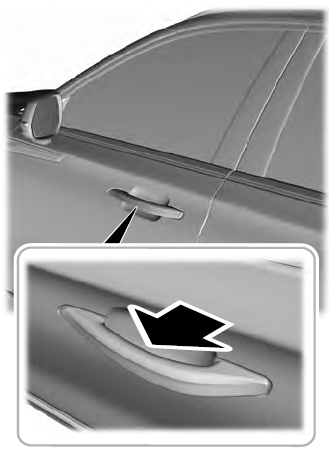
    Lincoln Aviator. Activating Intelligent Access

    read more

     
    Copyright © 2026 www.liaviator2.com