
Lincoln Aviator 2020-2026 Service Manual / Electrical / Instrumentation and Warning Systems / Parking Aid - Vehicles With: Rear Parking Aid / Removal and Installation - Rear Parking Aid Sensor
Lincoln Aviator: Parking Aid - Vehicles With: Rear Parking Aid / Removal and Installation - Rear Parking Aid Sensor
Removal
-
Remove the rear bumper cover.
Refer to: Rear Bumper Cover (501-19 Bumpers, Removal and Installation).
-
If equipped.
Position aside the connector shield.
.jpg) |
-
Remove the rear parking aid sensor.
-
Disconnect the electrical sensor.
-
Release the tabs.
-
Remove the sensor.
-
Disconnect the electrical sensor.
.jpg) |
Installation
NOTE: Make sure that the isolator rings are installed correctly while installing the sensors.
-
To install, reverse the removal procedure.
-
Carry out the azimuth system check.
Refer to: Azimuth System Check (413-13A Parking Aid - Vehicles With: Rear Parking Aid, General Procedures).
-
Carry out the elevation system check.
Refer to: Elevation System Check (413-13A Parking Aid - Vehicles With: Rear Parking Aid, General Procedures).
-
If any sensor fails the checks, diagnose the sensor fault.
Refer to: Parking Aid (413-13C Parking Aid - Vehicles With: Active Park Assist, Diagnosis and Testing).
 Removal and Installation - Parking Assist Control Module (PAM)
Removal
NOTE:
If installing a new PAM,
it is necessary to upload the module configuration information to the
scan tool prior to removing the module...

Other information:
Lincoln Aviator 2020-2026 Owners Manual: General Information
Condensation in the Exterior Front Lamps and Rear Lamps Exterior front lamps and rear lamps have vents to accommodate normal changes in air pressure. Condensation can be a natural by-product of this design. When moist air enters the lamp assembly through the vents, there is a possibility that condensation can occur when the temperature is cold...
Lincoln Aviator 2020-2026 Service Manual: Removal and Installation - Second Row Center Seatbelt Buckle
Removal NOTE: Removal steps in this procedure may contain installation details. Remove the second row center seat. Refer to: Second Row Center Seat (501-10B Second Row Seats, Removal and Installation). Detach and disconnect the second row center seatbelt buckle electrical connector...
Categories
- Manuals Home
- Lincoln Aviator Owners Manual
- Lincoln Aviator Service Manual
- Remove and Reinstall the Battery
- Wireless Accessory Charger (If Equipped)
- Disabling Auto-Start-Stop
- New on site
- Most important about car
Child Seats
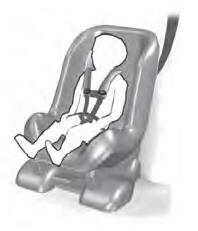
Use a child restraint (sometimes called an infant carrier, convertible seat, or toddler seat) for infants, toddlers and children weighing 40 lb (18 kg) or less (generally four-years-old or younger).
Using Lap and Shoulder Belts
WARNING: Do not place a rearward facing child restraint in front of an active airbag. Failure to follow this instruction could result in personal injury or death.

Copyright © 2026 www.liaviator2.com