
Lincoln Aviator 2020-2026 Owners Manual / Climate Control
Lincoln Aviator: Climate Control
- Automatic Climate Control
- Hints on Controlling the Interior Climate
- Rear Passenger Climate Controls
- Heated Rear Window and Heated Exterior Mirrors
- Remote Start
 Maintaining Your Head Up Display
Do not place objects onto the transparent
cover, as they may block you from seeing
portions of the image. These objects
could also damage the cover and affect
the quality of the projected image...
 Automatic Climate Control
Note: Depending on your vehicle option
package, the controls may look different
from what you see here.
Note: You can switch temperature units
between Fahrenheit and Celsius...
Other information:
Lincoln Aviator 2020-2026 Service Manual: Removal and Installation - Generator Pulley
Removal WARNING: Before beginning any service procedure in this section, refer to Safety Warnings in section 100-00 General Information. Failure to follow this instruction may result in serious personal injury. Follow the health and safety precautions...
Lincoln Aviator 2020-2026 Service Manual: Removal and Installation - Floor Console
Special Tool(s) / General Equipment Interior Trim Remover Removal NOTE: Removal steps in this procedure may contain installation details. Remove the front seats. Refer to: Front Seat (501-10A Front Seats, Removal and Installation)...
Categories
- Manuals Home
- Lincoln Aviator Owners Manual
- Lincoln Aviator Service Manual
- Description and Operation - Body and Frame
- Locking and Unlocking
- Child Safety Locks
- New on site
- Most important about car
Child Seats
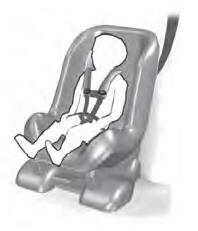
Use a child restraint (sometimes called an infant carrier, convertible seat, or toddler seat) for infants, toddlers and children weighing 40 lb (18 kg) or less (generally four-years-old or younger).
Using Lap and Shoulder Belts
WARNING: Do not place a rearward facing child restraint in front of an active airbag. Failure to follow this instruction could result in personal injury or death.

Copyright © 2026 www.liaviator2.com